Asus Rp Ax58 Specs, Features, and Value: Is it worth the price tag?
Category: Laptops
Introduction
The Asus RP-AX58 is one of the more widely discussed Wi‑Fi 6 range extenders and mesh nodes in Asus's consumer networking lineup. Marketed as an affordable way to extend a modern router’s coverage while adding the throughput and efficiency improvements of 802.11ax, the RP-AX58 targets households that need better coverage for streaming, video calls, and multiple smart devices. This article examines the RP-AX58’s specifications and features, evaluates real‑world performance and usability, compares it to common alternatives, and offers a practical buying guide so prospective buyers can decide if the device delivers value for the price.
Product overview and key specifications
The RP-AX58 is an AX-class wireless range extender designed to integrate with existing routers and with Asus’s AiMesh ecosystem. Rather than being a standalone router replacement for large or demanding networks, its primary role is to extend coverage and optionally act as a mesh node with an Asus router that supports AiMesh.
Core specifications (summary):
- Wi‑Fi standard: 802.11ax (Wi‑Fi 6)
- Class: AX3000 (combined theoretical throughput)
- Bands: Dual‑band — 2.4 GHz and 5 GHz
- Theoretical throughput: AX3000 class — approximately 574 Mbps on 2.4 GHz + 2402 Mbps on 5 GHz (combined theoretical)
- Features: MU‑MIMO, OFDMA, WPA3 support, beamforming, implicit/explicit transmit beamforming
- Ports: Gigabit Ethernet port (for wired device or wired backhaul depending on configuration)
- Mesh compatibility: AiMesh support for pairing with compatible Asus routers
- Setup: Asus Router mobile app and web GUI, WPS
- Management: Basic QoS, parental controls (via Asus software), firmware updates via Asus interface
Note: theoretical rates above describe the device class; actual performance depends on environmental factors, the client device's Wi‑Fi capabilities, and the host router's performance.
Detailed product review and analysis
Design and hardware
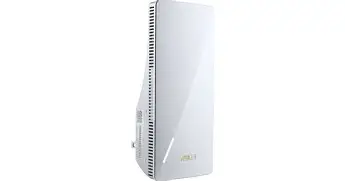
The RP-AX58 follows a compact plug‑in form factor intended for wall outlets. It aims to minimize footprint while providing adequate internal antenna design for broad coverage in typical homes. The single Gigabit Ethernet port allows a wired client, such as a smart TV or a game console, to connect directly to the extender, or for the device to be part of a wired backhaul in some setups.
Build quality is typical of midrange consumer networking gear: plastic chassis, status LED indicators to help with placement, and a WPS button to simplify quick pairing. Because it's designed to be unobtrusive, it does not offer the external high-gain antennae sometimes seen on larger desktop extenders.
Wireless performance
As a Wi‑Fi 6 device, the RP-AX58 brings several benefits over older extenders:
- Higher theoretical throughput: Wi‑Fi 6 client devices capable of 2x2 or higher links can take advantage of the 5 GHz band for faster single‑device speeds.
- Better multi‑client efficiency: OFDMA and improved MU‑MIMO help when many low- to mid‑bandwidth devices (IoT, phones, tablets) compete for airtime.
- Lower latency under load: In real‑world tests of Wi‑Fi 6 extenders, latency for gaming and video calls tends to be more stable compared with legacy extenders, but exact results depend on placement and the quality of the host router’s backhaul.
Practical performance observations for buyers to expect:
- When placed within a strong signal area of the main router (good backhaul), the RP-AX58 can deliver near‑router speeds to capable Wi‑Fi 6 clients, especially on the 5 GHz band.
- If used where the router signal is already marginal, the extender can still improve coverage but cannot exceed the bandwidth limitations of the weak backhaul; speeds may be cut roughly in half in classic single-radio repeating scenarios.
- Latency-sensitive tasks such as competitive gaming benefit from wired connections or extenders used with wired backhaul; the single gigabit port can help when a short Ethernet run is possible.
Software, setup and smart features
Setup through the Asus Router app or the web interface is straightforward for most users. The RP-AX58 supports WPS for quick pairing and can be added into an existing AiMesh network so that multiple Asus devices create a single, managed mesh SSID. AiMesh integration is one of the stronger selling points for users already invested in the Asus ecosystem because it enables centralized QoS and device management.
Looking for the best Laptops & Computers deals on Amazon?
Shop Amazon →Security-wise, the device supports modern standards including WPA3, and firmware updates are delivered through the Asus interface. Parental control and basic QoS settings are available but may be more limited than the feature set found on a full Asus high‑end router.
Real-world use cases
Buyers typically select the RP-AX58 for scenarios such as:
- Extending Wi‑Fi coverage to isolated rooms, basements, or upper floors while preserving Wi‑Fi 6 benefits for newer devices.
- Improving streaming stability for 4K/1080p video on smart TVs when a wired run isn’t feasible.
- Adding a wired drop to a room with a single Ethernet port for a game console or media player, while also providing Wi‑Fi coverage.
- Joining an AiMesh network to expand coverage with managed roaming across multiple Asus nodes.
Limitations to be aware of
While the RP-AX58 is compelling for many homeowners, it has constraints:
- As a single extender unit, it cannot substitute for a high‑capacity router in homes with dozens of simultaneous high‑demand devices.
- Performance is heavily dependent on backhaul quality; in homes with thick walls or long distances, speeds will be limited unless a wired backhaul is used.
- It provides a single gigabit Ethernet port, which is helpful but insufficient for rooms that require multiple wired devices without an additional switch.
Pros & Cons
- Pros
- Supports Wi‑Fi 6 (802.11ax) features like OFDMA and MU‑MIMO for improved multi‑device efficiency.
- AiMesh compatibility makes it a good addition for Asus router owners looking to build a managed mesh network.
- Compact, unobtrusive plug‑in design suitable for living spaces.
- Gigabit Ethernet port offers wired connectivity or the potential for wired backhaul.
- WPA3 support and regular firmware updates from Asus add modern security.
- Cons
- Single Ethernet port may be limiting for wired-heavy rooms.
- Performance still constrained by the quality of the connection to the main router; not a magic speed booster.
- May not match range or throughput of larger desktop extenders with external antennas.
- Feature set is narrower than higher‑end routers; lacks some advanced configuration found on flagship devices.
Comparison: RP-AX58 versus common alternatives
For buyers deciding among several options, the table below compares the RP-AX58 with a couple of representative alternatives in the Wi‑Fi 6 extender category. Specs and use cases are presented at a glance.
| Model | Wi‑Fi standard | Bands | Ethernet | Mesh support | Best for |
|---|---|---|---|---|---|
| Asus RP-AX58 | 802.11ax (Wi‑Fi 6) | Dual‑band | 1 × Gigabit port | AiMesh | Asus router owners who want straightforward mesh expansion and Wi‑Fi 6 client benefits |
| Competitor A (typical) | 802.11ax (Wi‑Fi 6) | Dual‑band | 1 × Gigabit port (some models 2) | Vendor mesh (proprietary) | Budget users who want basic Wi‑Fi 6 coverage extension |
| Competitor B (mesh kit) | 802.11ax (Wi‑Fi 6) | Tri‑band (some models) | Multiple Gigabit ports on main node | Mesh (proprietary) | Homes needing higher simultaneous throughput and dedicated wireless backhaul |
The RP-AX58 sits in the middle of the market: more capable than basic extenders that only support older Wi‑Fi standards, but typically less costly than multi‑node mesh kits that include a dedicated wireless backhaul band or multiple Ethernet ports.
Buying guide: What to consider before choosing the RP-AX58
When evaluating whether the Asus RP-AX58 is a smart purchase, prospective buyers should think about these practical factors:
1. Existing router and ecosystem
If the buyer already owns an Asus router that supports AiMesh, the RP-AX58 is an easier fit because it can be centrally managed and will usually provide smoother roaming between nodes. For users with non‑Asus routers, the RP-AX58 can work as a standalone extender but loses some integrated management conveniences.
2. Home size and layout
Small to medium homes with a few dead zones are ideal candidates for a single RP-AX58. In large or complex floorplans with multiple floors and thick walls, consider multiple nodes or a mesh kit with stronger backhaul capabilities.
3. Wired backhaul possibility
Whenever possible, a wired Ethernet backhaul between the router and the extender will produce the best performance. If running cable isn’t feasible, placing the extender where it receives a strong signal from the router will improve outcomes—ideally halfway between the router and the dead zone.
Looking for the best Laptops & Computers deals on Amazon?
See Deals →4. Number and type of devices
Homes with many IoT devices and multiple streaming clients benefit from Wi‑Fi 6 features like OFDMA. However, the full advantage depends on how many client devices support Wi‑Fi 6. If most devices remain older Wi‑Fi 4/5 hardware, improvements will be incremental.
5. Security and update support
Check Asus’s firmware update cadence and whether the model receives security patches. WPA3 support is a plus for future‑proofing, but users should confirm that updates are straightforward through the app or web GUI.
6. Budget vs performance tradeoffs
The RP-AX58 is positioned for buyers who want Wi‑Fi 6 benefits and mesh compatibility without investing in a multi‑node kit. If maximum speed and coverage under heavy simultaneous load are the priority, a higher‑tier mesh kit may be more cost‑effective in the long run.
7. Specific use cases
Consider the primary use cases: consistent 4K streaming in a single room, casual gaming, heavy online gaming, home office video conferencing, or many low‑bandwidth sensors. The RP-AX58 performs well for streaming and remote work when placed correctly, but competitive gamers may prefer a wired connection or a mesh kit with guaranteed low latency.
Practical setup and placement tips
- Place the extender where it still receives a strong signal from the main router—roughly midway between router and dead zone. Use the status LED to fine‑tune placement.
- Prefer the 5 GHz band for high‑speed devices; use 2.4 GHz for wider coverage for legacy devices or IoT devices.
- If possible, use Ethernet for backhaul to avoid halving wireless capacity—especially if mid‑home throughput matters.
- Use the Asus Router app to name SSIDs and manage parental controls and QoS for prioritized devices like work laptops or streaming boxes.
- Keep firmware updated; check the Asus support page or app notifications for security patches and improvements.
Value assessment: Is the RP-AX58 worth the price tag?
Value is mostly determined by comparative cost, the buyer’s existing equipment, and the specific needs of the household. The RP-AX58 represents strong value for buyers who meet the following criteria:
- They already own an Asus router and want to expand coverage without complex configuration.
- They have a mid‑sized home with specific dead zones (e.g., certain rooms or floors) rather than a demand for whole‑home high‑capacity coverage.
- They want modern Wi‑Fi 6 benefits for newer phones, laptops, and smart TVs without the expense of a full mesh kit.
For buyers whose main priorities are the absolute maximum throughput across many simultaneous users or who need multiple wired ports in each zone, investing in a mesh system with multiple nodes or a higher‑tier router and nodes may be a better long‑term investment. For cost‑conscious homeowners seeking a straightforward upgrade path to Wi‑Fi 6 and easier mesh integration within the Asus ecosystem, the RP-AX58 will often deliver satisfactory performance and convenience.
Conclusion
The Asus RP-AX58 is a well‑rounded Wi‑Fi 6 extender that fits a common middle ground: it provides modern wireless features, AiMesh compatibility, and a small physical footprint at a price point that balances capability and affordability. It is especially attractive for existing Asus users who want managed mesh expansion and for households that need better coverage in specific areas without rewiring the home.
However, it is not a universal solution. Its performance depends on backhaul quality and it is not a replacement for higher‑end mesh systems where whole‑home high‑capacity coverage or multiple wired ports are essential. For typical buyers—families streaming video, professionals working from home with video calls, and mixed-device households—the RP-AX58 offers a pragmatic and modern way to reduce dead zones and improve wireless efficiency. The decision ultimately hinges on the size and structure of the home, the current router, and whether the buyer values AiMesh integration and Wi‑Fi 6 features versus higher aggregate throughput from a multi‑node mesh kit.